When AI Edits Your Words, Keep Your Meaning
Contents
“Make this sound more natural.”
It is a familiar request when asking AI to help with an email or an announcement. Yet the result can feel slightly wrong. The sentences are grammatical, but they no longer sound like you. Or a cautious statement has become a firm promise.
Consider this example:
If you reply by Friday, I can send it next week.
Shortening that to “I’ll send it next week” makes it crisp and easy to read. It also removes the Friday deadline and turns a possibility into a commitment. Those changes are easy to miss if you judge the result only by how smoothly it reads.
WQE, short for Writing Quality Editor, is a skill I build and use to give AI guidance on problems like these. Its aim is to make writing natural for its readers while keeping the meaning and conditions intact.
A skill keeps useful instructions ready to reuse#
If “skill” is unfamiliar, think of it as a set of working instructions that an AI tool can read when needed. WQE describes what to look for when writing or editing, and what to leave alone.
Requests such as “keep my tone,” “don’t add information,” and “leave dates and conditions unchanged” become a reusable set of instructions. I can call on those instructions when handing over another piece of writing, and refine them with examples when I find an awkward sentence.
Saving instructions does not mean the AI will follow them every time. Someone still needs to read the finished piece.
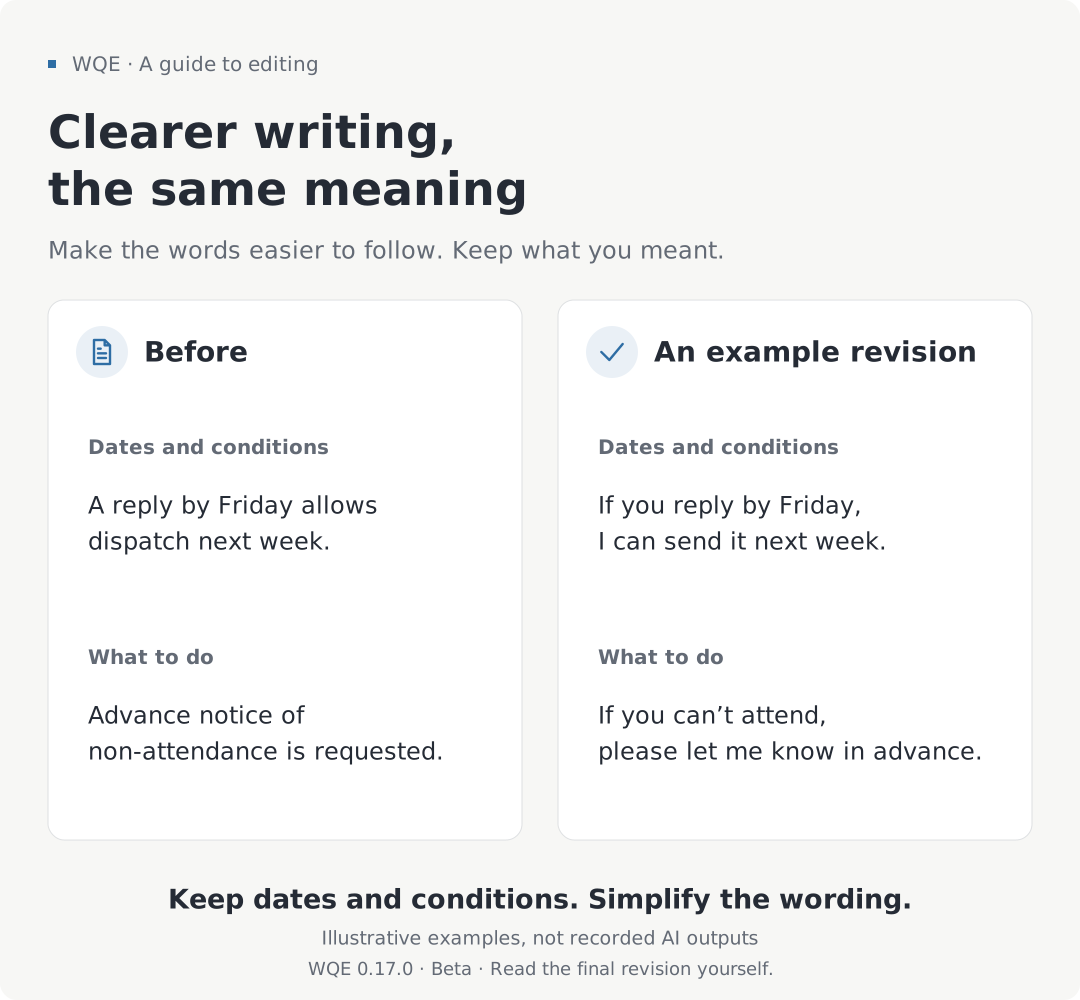
Keep the meaning; explain it for the reader#
The diagram uses examples written to explain the editing principles. It does not show what WQE will produce on every run.
Facts and conditions come first. Dates, amounts, names, and links need to survive an edit. So do instructions to give notice, exceptions to a rule, and who is responsible for doing something.
The writer’s voice matters too. A warm message to a friend does not need to become an official notice. If a sentence already reads naturally, leaving it alone may be the best edit. More changes do not necessarily make a better result.
The explanation, however, should fit its readers. Unfamiliar terms may need a plain explanation, and an important condition buried near the end may need to move earlier. When moving between languages, the order can change to make the writing easier to follow, while the information stays the same.
Correct grammar can still make a reader work too hard#
Imagine a meeting invitation that says, “Notification of your attendance status is requested.” Most readers can work out what it means. “Please let me know whether you can attend” is a more natural choice for an everyday invitation.
This is one area I have focused on in recent WQE updates. If readers must mentally translate a sentence into ordinary language, a grammar check alone is not enough. The instructions now put more emphasis on explaining what happened and what to do directly, instead of using language that belongs in an editor’s internal notes.
Simplifying a sentence must also preserve its point. “It did not rain today, so we could not check whether the umbrella keeps water out” cannot become just “It did not rain today.” That loses what the observation could not tell us. This is another illustrative example: keeping the answer the reader needs matters more than making the sentence shorter.
When a problem appears in one sentence, WQE’s guidance also asks the AI to look for the same problem elsewhere in the requested document. This is not a list of banned words or a reason to expand every sentence. The question is whether the intended reader can understand it readily.
Ways to ask for help#
WQE is designed for editing existing prose, drafting from notes, identifying awkward passages without changing them, and adapting writing between English and Korean. You do not need to memorize names for these tasks. Say what result you want.
For an email, you might ask:
Use WQE to edit this email. I’m contacting this person for the first time. Keep it polite without making it stiff, and preserve the dates and what I’m asking for.
If you only want feedback, make that clear:
Use WQE to point out where a reader might get stuck. Don’t rewrite the text yet.
To turn notes into a new draft, provide the material:
Use WQE to turn these notes into a meeting announcement. Make it clear for someone attending for the first time. Ask me about any missing time or location instead of filling it in.
The reader, the purpose, and the details that must stay unchanged give the AI something concrete to work with. Missing experiences or numbers should not become plausible additions to the story.
Keep your meaning when moving between English and Korean#
Adapting writing from English to Korean, and from Korean to English, is a main feature of WQE. The aim is to choose wording and an order that feel natural to readers of the other language, while keeping the same message.
For an English email that needs to become Korean, you could ask:
Use WQE to adapt this email into natural Korean. Keep the polite request, the reply deadline, and the condition for postponing the meeting.
| English original | Example Korean adaptation |
|---|---|
| Could you get back to me by Friday? If not, we’ll need to move the meeting to next week. | 금요일까지 답해 주실 수 있을까요? 그때까지 답을 받지 못하면 회의를 다음 주로 미뤄야 합니다. |
“Get back to me” asks for a reply, not a return visit. The Korean wording should express that naturally while preserving the Friday deadline and what happens if no reply arrives.
It works in the other direction too:
Use WQE to adapt this message into natural English. I’m politely declining an invitation and offering another time. Preserve that I can’t attend this week and when I’m available.
| Korean original | Example English adaptation |
|---|---|
| 이번 주에는 참석할 수 없어요. 다음 주 화요일 오후에는 가능합니다. | I can’t make it this week, but I’m available next Tuesday afternoon. |
These examples were written to illustrate the approach. When using an adaptation, check that dates, conditions, and the strength of the request have survived the change of language.
What still needs a human read#
The current public version is WQE 0.17.0. It remains in Beta and is still being refined through use. Adding instructions is different from showing that they work in every situation.
Checks have found missed conditions, inferred purposes that were not supplied, and unnecessary edits to sentences that were already fine. Results can vary with the AI model and how it is run. The newest guidance has not been tested equally across all environments. Cross-language checks have focused on English and Korean.
For an important piece, compare the original and the revision side by side. Are the dates and conditions still there? Has “can” become “will”? Has the AI added an experience you never had? Natural prose is not proof of factual accuracy. WQE does not replace fact-checking or professional legal or security review, and it is not intended to hide AI authorship or sources.
When I come across a sentence that feels wrong, I use an appropriate revision to help refine the guidance. That gives me a clearer set of instructions to use on the next piece.
Trying WQE#
First, install WQE in an AI tool that supports skills. The installation guide covers Claude Code and Codex. Install the whole writing-quality-editor folder, since the skill uses several files together.
After installation, supply your text and the result you want, as in the examples above. If the tool does not recognize the abbreviation WQE, use its full name, writing-quality-editor.
The WQE user guide on GitHub includes detailed instructions and English–Korean adaptation examples. Version changes and checks are recorded in the changelog and the 0.17.0 release notes.