Putting SessionCue on Hold, and Trying iTerm2’s Claude Code Integration
A while ago, I started building a small tool and then put it on hold. It’s called SessionCue.
With several Claude Code and Codex sessions open at once, it was easy to miss which one was waiting for approval or input. I kept switching between terminals to check whether a session was still working or had stopped to wait for me.
SessionCue was a macOS menu bar app I was building to make that easier. The goal was to bring together session status from multiple tools and show which sessions needed my attention. Its focus was on letting me know when to check in, rather than launching or directing agents. I also considered integrating it with iTerm2.
As I watched the direction agent tools were taking, I began to think it would be better to wait and see. So I paused development.
With the project still on hold, I set up iTerm2’s Claude Code integration on September 11, 2026. Seeing it in action made me feel that pausing had been the right decision.
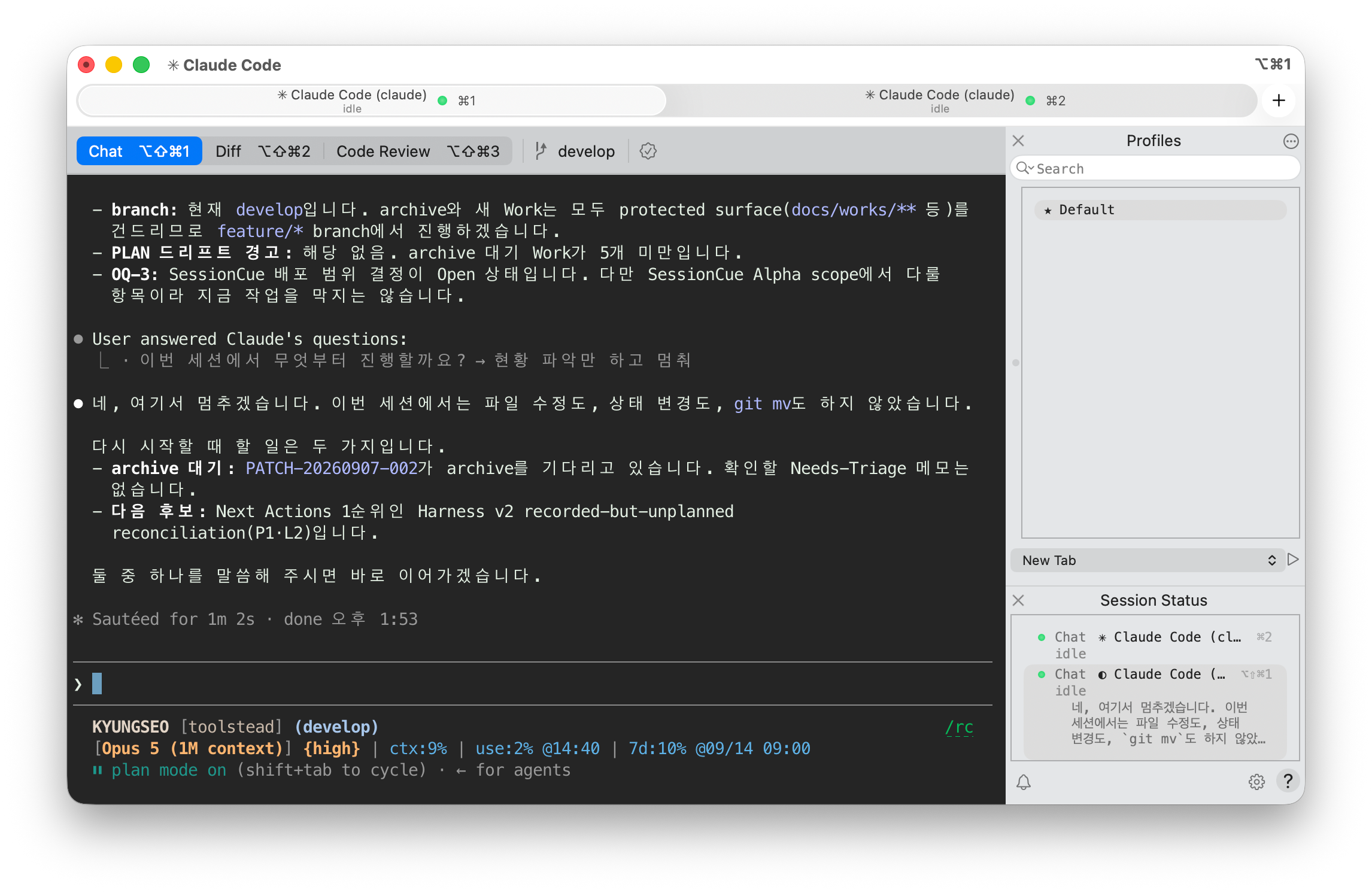
My iTerm2 setup. The Session Status panel on the right shows two Claude sessions in the idle state.
iTerm2 introduced Claude Code integration as a major feature of its stable 3.7 release on September 8. The feature had previously been available in beta. Release announcement, beta release notes
Setup starts with “Install Claude Code Integration” in the iTerm2 menu. The installer walks you through enabling the Python API, configuring hooks that report Claude’s status, and setting up a Workgroup that brings the related views together. With automatic entry enabled, running claude in the selected terminal profile opens the workspace alongside it. Official setup guide
At the top, you can switch between Chat, Diff, and Code Review. You can talk to Claude, inspect code changes, and request a review in a separate session. iTerm2 calls this way of grouping related sessions Workgroups. Workgroups documentation
What particularly caught my attention was Session Status on the right. It brings together sessions that are working, waiting for approval or input, or finished and ready for the next request. Sessions that need a response move to the top, and clicking one takes you to that session. This directly addresses the problem I had been trying to solve with SessionCue. Session Status documentation
There are limits to that overlap. The integration provided by the installer is for Claude Code. Workgroups is a general-purpose feature that can be configured to run other CLIs, but displaying each tool’s working state also requires a connection that reports that state to iTerm2. This setup alone does not fully cover SessionCue’s goal of handling Claude Code and Codex together. Integration scope, reporting session status
Even so, I now have less reason to build and maintain a separate app. Much of the problem can be addressed inside the terminal I already use. Before relying on it, though, I still need to check the security settings and what data is sent where.
The experience made me reconsider how much to build myself when working on small developer tools.
An everyday frustration is a good starting point. SessionCue grew out of a problem I actually had. But whether solving it requires me to keep developing a separate app is another question. If a tool I already use offers similar functionality, it makes sense to try it first and see what still gets in the way.
A separate app brings ongoing work. When an agent changes how it reports its status, the connection needs checking. Old status information must not linger on screen and mislead people into thinking it is current. Installation and updates need to keep working, too. Even a small status panel takes more than building the interface if people are going to rely on it.
So I’m trying to base my decisions less on “how much code I’ve already written” and more on “how much reason remains to maintain this as a separate tool.”
I want to start by checking whether configuring an existing tool is enough, whether a small connection between tools would do, or whether a problem remains that really needs a separate app. There are more features I could add to SessionCue, but being able to add features is not, by itself, a reason to keep developing it.
One experience cannot explain the entire market for AI developer tools. Still, seeing the problem I had been working on addressed within the terminal was a meaningful change when deciding where to spend my time and effort.
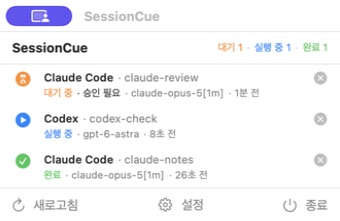
The SessionCue 0.0.1 alpha UI connected to live Claude Code and Codex sessions, showing approval pending, running, and completed states together. For the capture, I opened the same menu bar UI in a separate window.
I plan to leave SessionCue on hold. I’m keeping these screenshots as a record of what I built.
For now, I want to see how well I can keep track of sessions waiting for my response within the tools I already use.