What to Design Before Pressing the Release Button
Contents
When a private repository is about to become public for the first time, one concern tends to come before all others:
Did I accidentally commit an API key or token, a path from my computer, account information, or an internal address that should never be public?
GitHub provides a button to make the repository private again. That button cannot recall copies that have already been cloned or downloaded. Forks created while the repository was public do not automatically become private when the source repository does. GitHub documents both the consequences of changing repository visibility and the effects on forks.
If the exposed information is a password or token, hiding the repository or deleting a commit is not enough. GitHub’s guidance on removing sensitive data from a repository starts by telling you to revoke or rotate the credential. A credential that may already have been exposed is an incident-response problem, not an ordinary rollback.
github-release-guide starts at this boundary. Before the Public button is pressed, it checks what may be mixed into the repository, makes unverified areas explicit, and gives the user another decision point before an irreversible change. It treats a release not as one command to run, but as a sequence in which assessment and explicit approval determine who may perform each change.
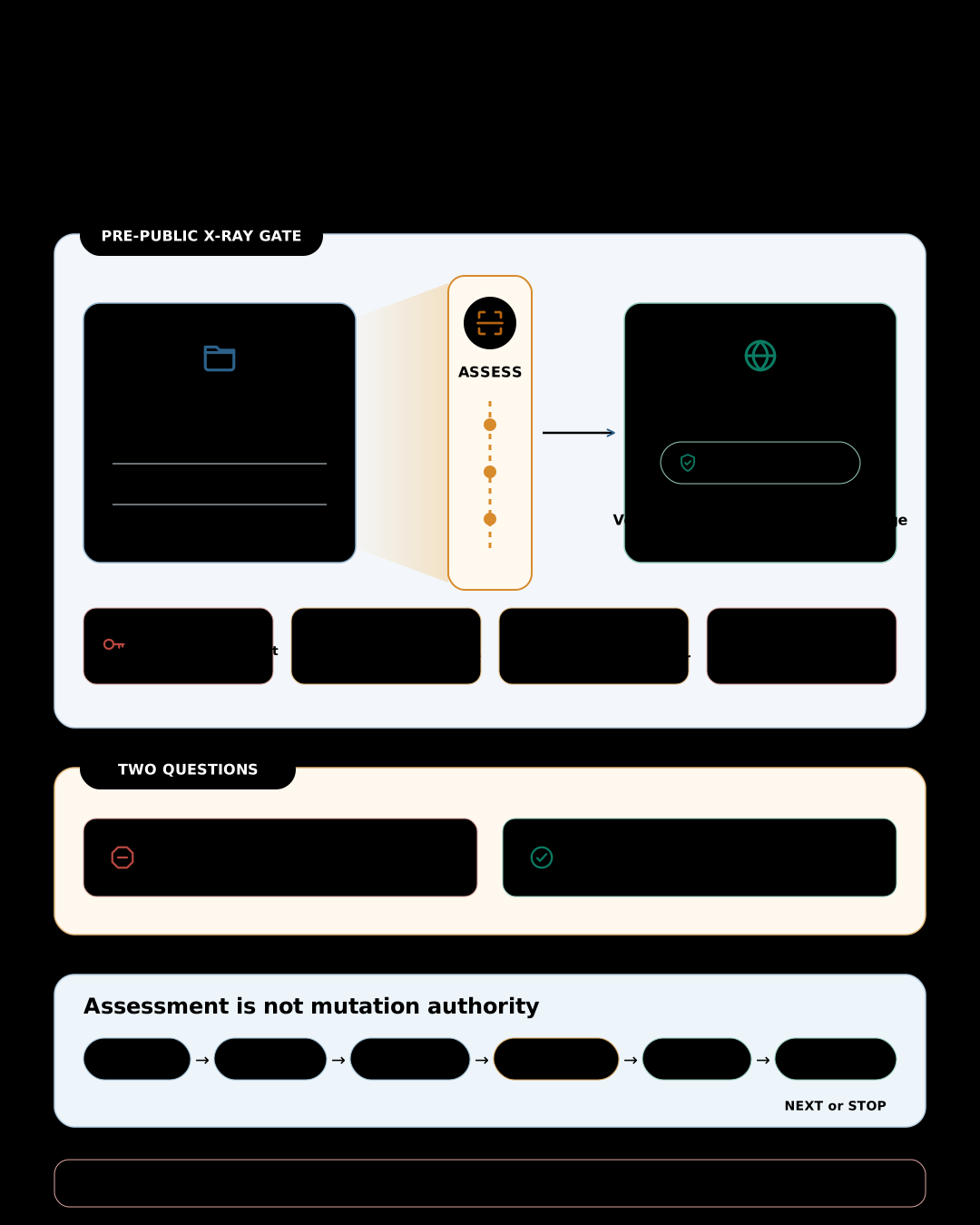
Check what is mixed into the repository before publication#
For a first public release, Assess looks for sensitive information and history risks within the evidence it can inspect.
- It checks tracked source, documentation, configuration, and generated text for values that resemble API keys, tokens, passwords, or private keys.
- It considers whether values removed from current files may still remain in commits, tags, or related Git history.
- It flags personal paths, user names, email addresses, account or organization identifiers, and internal server URLs for a publication decision.
- It inspects archives, PDFs, Office files, images, and screenshots where content or metadata may retain information, to the extent those formats can be checked.
- It checks whether environment, CI, and deployment configuration contains or directly references values that should not become public.
The skill does not print or copy the full credential value while reporting a finding. It shows the location, the type, and a redacted identifier where necessary. Nor does it declare every identifier sensitive. An internal URL or account ID may be intentionally public, so contextual cases are left for a person to decide.
Most importantly, “nothing was found” is not treated as “no sensitive information exists.” An unavailable check or unreadable file format remains unknown, and this assessment does not replace a professional secret investigation or security audit. The skill does not certify the absence of sensitive information. It finds mistakes that can be checked and creates an opportunity to stop before publication.
Two questions must be answered before going public. Is there anything in the repository that should not be exposed? Do the documentation, installation steps, and version information being published match the actual release state?
The second question covers README and installation instructions, LICENSE, version, CHANGELOG, and release notes. For a later version of an already-public repository, the skill also checks the target commit, existing tag conflicts, branch and tag protection, and evidence that the documented installation and compatibility claims work. github-release-guide is therefore more than a secret scanner. It also checks that what a project promises to publish matches what the release will actually contain.
After those questions have been answered, the assessment still must not become mutation authority by itself.
Separate assessment from mutation#
The first choice is between Assess and Guided.
Assess is read-only. It gathers the repository and GitHub state it can observe, then reports readiness as Ready, Needs attention, or Blocked. Missing information remains unknown instead of being guessed. Read access also does not authorize the skill to run repository scripts or builds. Permission to inspect code and a decision that the code is safe to execute are different things.
Guided does not jump directly into mutation either. It completes Assess first and resolves release-blocking issues. It then handles one change at a time:
ASSESS → PREVIEW → RECHECK → APPROVAL → MUTATE → VERIFY → NEXT or STOP
The skill previews what it intends to change. Immediately before the mutation, it rechecks the target branch, commit, tag, visibility, and other relevant premises. If the state has changed, the earlier approval no longer applies. The skill explains the new state and asks again. After the mutation, it verifies the result before proposing the next change.
This can look slower than executing a release plan in one shot. It also makes partial failure observable and prevents consent to a plan from turning into authority for every mutation in that plan.
Why one release is divided into several approvals#
Editing files, committing, pushing, creating a tag, changing repository visibility, changing settings, and publishing a GitHub Release have different consequences. The skill does not collapse them into one generic “release approval.”
Making a private repository public is kept separate in particular. Public content can remain in clones, forks, caches, and mirrors. Switching the repository back to private cannot recall those copies. Automated secret checks also do not prove that nothing sensitive exists. Immediately before the visibility change, github-release-guide restates that irreversibility and asks for direct approval of that change alone.
Published tags require similar care. The skill does not move, delete, and recreate a tag that has already been distributed or whose exposure history cannot be established. There may be no way to know what users have already installed. In those cases it considers forward repairs such as a new tag or follow-up release, while risky remediation is left to qualified people or a separate specialist procedure.
For an existing Release, “can it be deleted?” and “can the exposed content be recalled?” remain separate questions. The skill evaluates the particular mutation, and before deleting an Immutable Release it explains that the associated tag name cannot be reused.
Safe automation is less about replacing decisions than about not hiding the moments of decision and their consequences.
A first public release and a later version are different problems#
The skill currently supports two GitHub release profiles.
first-public applies when an existing private repository on github.com becomes public for the first time. Along with the sensitive-information and history checks, it covers the license decision, initial version, public messaging, and repository settings. In Guided, the visibility change receives its own approval after the irreversibility warning.
version-release applies whenever an already-public repository publishes another version. It checks the target version, the file that defines it, the CHANGELOG, release notes, target commit, existing tag conflicts, and evidence behind installation and compatibility claims. If users depend on pinned tags, it also checks that branch and tag protections fit the release model.
Both are release operations, but they expose different things and carry different failure costs. The skill applies common checks first, then profile-specific rules instead of forcing both through one universal checklist.
Completion also requires evidence#
If only part of a change succeeds, the skill does not proceed. It records what was attempted and the current local and remote state, then stops. It also separates an ordinary rollback from incident response. Possible public exposure or credential exposure cannot be closed merely by saying that the repository was restored to its previous setting.
The final step follows the same rule. Creating a tag does not finish a release. The selected profile’s post-publication checks must pass, and each success claim needs directly observed evidence. Otherwise the result remains partial or blocked, with one safest next action.
The safety described here is deliberately bounded. github-release-guide focuses on the first public release and later version releases on github.com. It does not replace repository creation, package-registry publication, binary signing, cloud deployment, security audits, force-pushes, or history rewrites. It does not take the user’s release authority away.
Within Skillstead’s recorded validation scope, Claude Code and Codex are Supported, and the skill’s maturity is Stable. Those labels do not guarantee that every repository or release will succeed. They mean the core behavior passed the recorded simulated scenarios and live end-to-end checks.
The point is to leave the decision with the user:
- An assessment is not approval to mutate.
- Approval of a plan is not approval of every later action.
- When the state changes, prior approval must be reconsidered.
- A successful command is not the same as verified completion.
- Reversing visibility is not the same as recalling copies that already escaped.
When those five boundaries are clear before the release button is pressed, automation can become faster without hiding the risk. If they are blurred, even perfectly executed commands do not make the overall release safe.
Installation#
Install the complete github-release-guide skill folder, including its references. For a reproducible installation, pair the pinned tag in the Skillstead installation guide with the skills/github-release-guide/ folder. The commands below install the v0.9.0 version verified for this article into a macOS/Linux project. Run only the block for your agent environment.
Claude Code project:
install_root="$(mktemp -d)"
git clone --depth 1 --branch github-release-guide/v0.9.0 https://github.com/kyungseo/skillstead.git "$install_root/skillstead"
mkdir -p .claude/skills
cp -R "$install_root/skillstead/skills/github-release-guide" .claude/skills/
Codex project:
install_root="$(mktemp -d)"
git clone --depth 1 --branch github-release-guide/v0.9.0 https://github.com/kyungseo/skillstead.git "$install_root/skillstead"
mkdir -p .agents/skills
cp -R "$install_root/skillstead/skills/github-release-guide" .agents/skills/
See the Skillstead installation guide for global installation, Windows PowerShell, updates, and the latest pinned tag. After copying the folder, ask for github-release-guide by name. To inspect readiness without changing anything, start by asking for Assess.
The github-release-guide README explains the two modes, release profiles, and support boundaries. The full catalog is available in Skillstead.