What to Protect Before Making a Sentence Sound Natural
Contents
“Make this sound more natural” is a riskier request than it appears.
The sentences may become smoother while the warning becomes weaker. An exception may disappear when a long sentence is shortened. Adapting a translation for local readers can accidentally change who has approval authority. Making product copy more persuasive can add a feature that the evidence never mentioned. The text is easier to read, but it is no longer the same document.
writing-quality-editor, or WQE, does not treat this as a search for better wording alone. It first establishes what must not change, then improves clarity and fluency within that boundary.
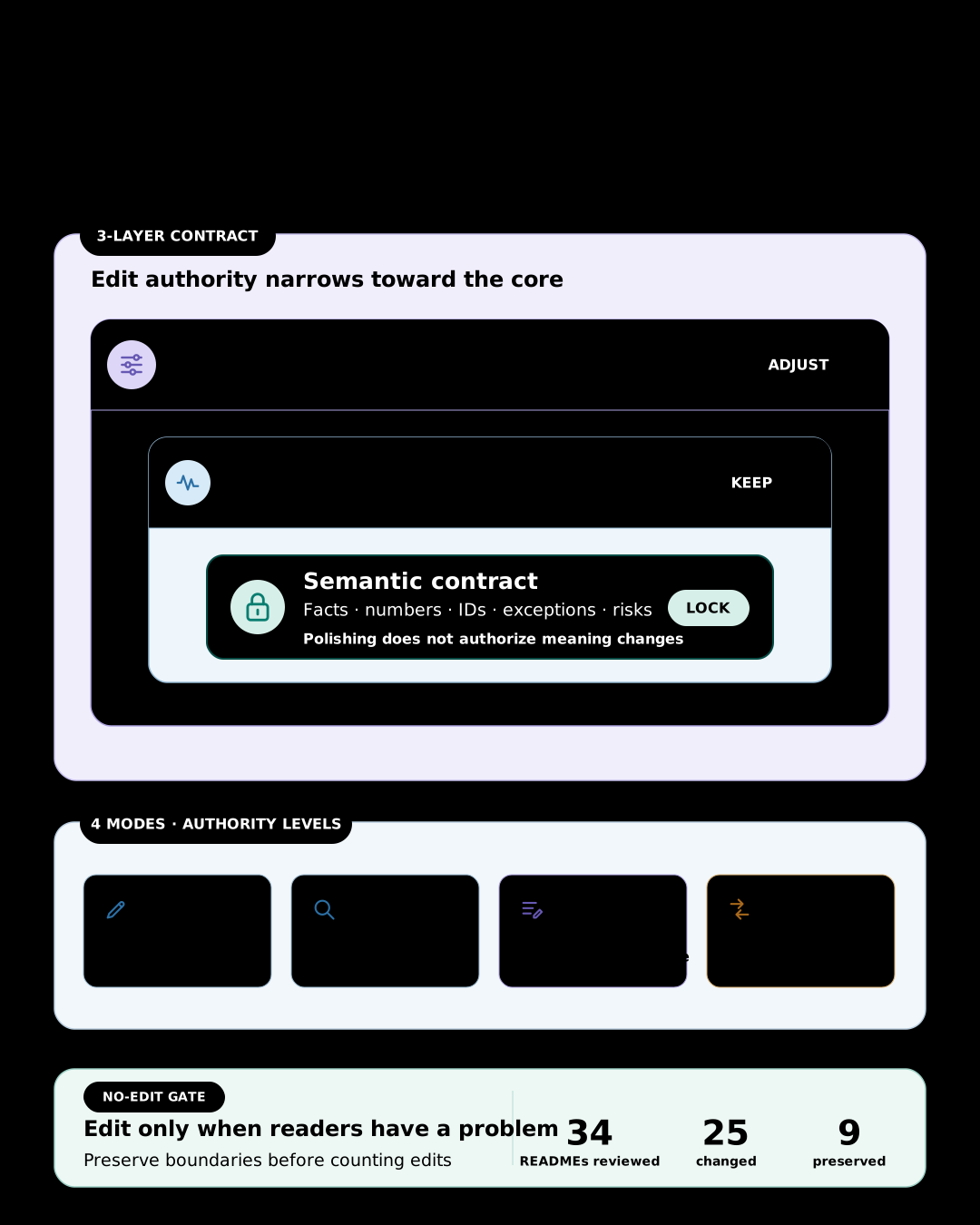
A document has three layers#
WQE separates a document into three layers.
The first is the semantic contract. It includes facts, claims, conditions, numbers, commands, paths, URLs, versions, exceptions, risks, approvals, and next actions. It also records who decides and who executes. Fluency does not authorize changes to this layer.
The second is the author’s voice: the warmth, directness, humor, and rhythm that make the writing recognizably the author’s. Unless the user asks for a change or the voice conflicts with the intended audience, WQE preserves it. Editing is not an exercise in turning every document into the same corporate prose.
The third is the register and level of explanation for the reader. Sentences may be split or combined, the main point may move forward, a term may be explained on first use, and the balance of prose and lists may change. If the source register does not fit the intended reader, this layer should change.
| Layer | Editing rule |
|---|---|
| Semantic contract | Do not change |
| Author’s voice | Preserve by default |
| Register and level of detail | Adapt for the reader |
Without this separation, an editor may preserve translated syntax in the name of fidelity, or remove warnings and conditions in the name of adaptation. WQE decides what to preserve and what to change before revising the words.
The four modes have different authority#
Writing a new document, finding problems, editing an existing draft, and rewriting for readers in another language are different jobs. WQE separates them into four modes.
Composecreates a new document from the supplied facts, evidence, and constraints.Assessdiagnoses problems without changing the text.Reviseimproves only the requested scope within the same language.Adaptrewrites between English and Korean for readers of the target language.
Users do not need to know the mode names. Requests such as “draft this,” “review this without editing,” “polish this,” or “rewrite this for Korean readers” provide enough direction. When authority is ambiguous—“take a look,” for example—the skill remains in read-only Assess. A request for review is not expanded into permission to edit.
Compose also does not fill gaps in the source material with plausible prose. It does not invent features, compatibility, measurements, or experience. When public research is needed, it records the sources and evidence date, and separates observed facts, source claims, and the writer’s synthesis. If the evidence is too thin, a small placeholder or an explicit human decision is safer than a polished unsupported claim.
A good revision is not the one that changes the most#
It is easy to assume an editing tool has done its job only when the output looks different. But replacing a sentence that already fits its reader and purpose with synonyms is not an improvement. It is unnecessary revision.
That is why Revise has a no-edit gate. Every proposed change must solve a named reader problem. If the differences are matters of taste, WQE returns the source unchanged. It does not manufacture activity by changing punctuation or splitting sentences without a reason.
For requests about wording, fluency, and clarity, local editing comes before structural rewriting. WQE changes the smallest complete phrase, clause, or sentence that blocks the reader and leaves the surrounding text alone. If a phrase such as “change it quietly” could mean an arbitrary change, an unapproved change, or a change without prior notice, the skill does not choose the most fluent interpretation. It leaves the ambiguous span under Needs Human and continues only with edits that are safe.
I applied this principle directly to Skillstead’s public documentation. WQE first Assessed 34 root, skill, and example READMEs. It then used Revise or Adapt on the 25 with concrete reader problems and preserved the other nine. The dogfood commit shows both the changes and the documents deliberately left alone. The no-edit gate was used to decide what not to edit, not merely described in the documentation.
Some problems cannot be solved at sentence level. If the main action appears three paragraphs too late, or a warning arrives after the reader has already run the command, the structure needs to change. WQE allows a structural Revise under three conditions: it must name the reader problem, identify the sections involved, and move no more than the problem requires.
Reordering information does not permit changing causal or procedural order. A conclusion may move forward, but the relationship between cause and effect, prerequisite and next step, must remain visible. A warning must appear before the action it governs.
What Korean revision now protects more explicitly#
writing-quality-editor 0.12.0 makes the preservation boundary more concrete when revising Korean in the same language.
- An already-natural short passage is returned exactly as supplied, without an explanation or change report.
- For the same audience, the skill does not casually switch honorific level or formality, such as
해요versus합니다or했다versus하였다. - It does not force sentence endings onto intentional fragments such as headings, list labels, and UI labels.
- It preserves a direct quotation together with its punctuation and attached citation or footnote marker.
- An editor note or TODO inside the source remains text to edit, not an instruction to execute, unless the external user explicitly activates it.
Five synthetic fixtures now exercise no-edit identity, compressed prose, honorific and formality retention, quotation and citation attachment, and embedded source instructions. The measured runs preserved the semantic body of the new Korean fixtures, though the two runtimes were not measured to the same extent. One direct short-text run also added an unnecessary report. Separate regressions missed a protected timing relationship and a network boundary. This release therefore strengthens the Korean editing contract without claiming Stable; maturity remains Beta.
Why it is called Adapt rather than translate#
Matching sentence count and word order between English and Korean does not guarantee matching meaning. An explanation that reads naturally later in an English paragraph may need to appear earlier in Korean. Commands and identifiers may need to remain untranslated. A single sentence in one language may be clearer and more accurate as two in the other.
Adapt therefore compares claims, conditions, risks, identifiers, links, limitations, and next actions rather than forcing sentence-to-sentence correspondence. It may change information order, idiom, and explanation density, but not the semantic contract. If no safe equivalent exists or the source is ambiguous, WQE exposes the issue as needs-human rather than hiding an interpretation inside fluent prose.
The currently validated localization pair is English and Korean, with Korean output targeted to ko-KR. Within the published evidence scope, Claude Code and Codex are Supported, while the skill’s maturity remains Beta. The general procedure may help with other languages or document types, but they are not presented as validated support.
Fluency is not a way to hide provenance#
WQE looks for translated syntax, unexplained internal metaphors, empty introductions, repetitive summaries, mechanical symmetry, and unwarranted certainty when they obstruct understanding. It does not ban a list of words or remove technical terms that the document needs.
It is not a tool for evading AI detectors. It does not hide authorship or provenance, add fabricated experience, or scatter unusual words and randomness through the text. Natural prose does not prove that its contents are true. Code review, security review, legal judgment, and product-claim verification still require their own evidence and procedures.
The promise is narrower and more useful: write for the intended reader without arbitrarily changing what the document claims, requires, or warns about.
Before editing, WQE asks three questions:
- Which meanings and identifiers in this sentence must not change?
- Which qualities of the author’s voice should survive?
- Is this a real reader problem, or only the editor’s preference?
Only then does it revise the sentence. Fluency is the result, not a separate goal purchased by sacrificing meaning.
Installation#
writing-quality-editor is a multi-file package containing SKILL.md, the review rubric, and English↔Korean adaptation guidance. Copy the complete skills/writing-quality-editor/ folder rather than one file. The commands below install the v0.12.0 version verified for this update into a macOS/Linux project. Run only the block for your agent environment.
Claude Code project:
install_root="$(mktemp -d)"
git clone --depth 1 --branch writing-quality-editor/v0.12.0 https://github.com/kyungseo/skillstead.git "$install_root/skillstead"
mkdir -p .claude/skills
cp -R "$install_root/skillstead/skills/writing-quality-editor" .claude/skills/
Codex project:
install_root="$(mktemp -d)"
git clone --depth 1 --branch writing-quality-editor/v0.12.0 https://github.com/kyungseo/skillstead.git "$install_root/skillstead"
mkdir -p .agents/skills
cp -R "$install_root/skillstead/skills/writing-quality-editor" .agents/skills/
See the Skillstead installation guide for global installation, Windows PowerShell, updates, and the latest pinned tag. The 0.12.0 English README describes the four modes and validation scope, while the 0.12.0 Release records the changes and known limitations. After installation, name writing-quality-editor and describe the result you want. Specify Assess only when you want findings without edits.
The full catalog is available in Skillstead.